
Place booking elements on your Shopify theme
Enable the app embed and position booking blocks for products, calendars, and service lists.
On this page
The theme editor controls where booking UI appears. Use the app embed for the product-page widget, then add blocks where you want a button, events calendar, or services list.
Enable the app embed
- In Shopify admin, open Online Store → Themes and customize the theme customers use.
- Open App embeds, enable CB Booking & Rentals, and click Save.
- Return to CB Booking and confirm Settings → Theme → Global Appearance → Enable Storefront is on.
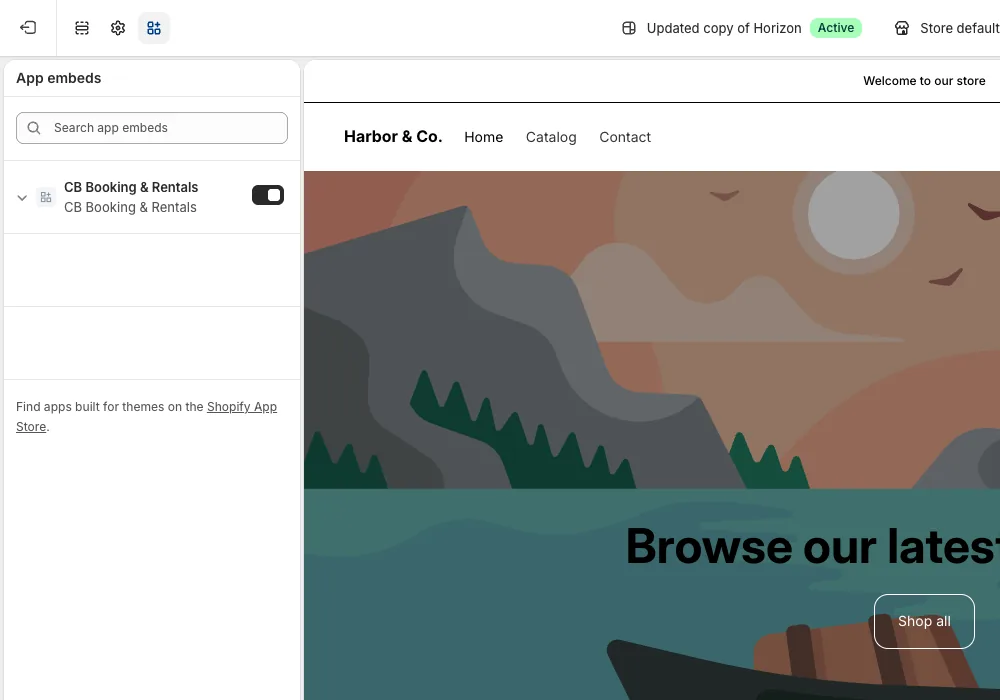
The embed is set per theme. Repeat the check after publishing or switching themes. Automatic product-page booking UI also requires a product attached to an active event.
Add blocks where customers need them
In the theme editor's section or block picker, add one of the CB Booking blocks and place it in the desired template or section:
- Popup calendar button: a Book now button that opens the booking calendar in a popup.
- Inline calendar: the booking calendar shown directly on the page.
- Featured service card: image, name, price and a Book now button for one service.
- Events Calendar: every upcoming event in a month or list view (you can limit which events show, see below).
- Event collection grid: cards for your services with an availability search.
For the first three, choose the event's product in Product, or paste the Event ID from the event's Marketing tab. The fastest way is the event's Marketing tab: Add to storefront opens the theme editor with the block already added. Save the theme, then preview the page that uses that template.
App block support and placement depend on the theme's sections. If an older theme does not expose the expected app block or embed location, inspect its available templates and theme support before editing code. Do not assume a missing picker means the event itself is broken.
Filter events on the calendar
When using the Events Calendar block, you can choose to display only specific events instead of every active event. In the block's settings, use the Choose which events to show options:
- Events to show: Pick specific products tied to your events.
- Product tags: Enter comma-separated tags (e.g.,
workshop, vip). This shows events whose product has any of these tags (case-insensitive). - Event names or product handles: Enter comma-separated terms. This matches part of an event's name, or a product's handle exactly.
Leaving all of these fields empty will show every active event. If you fill in more than one field, an event will show if it matches any of your rules. Note that if you also set a Location filter, that applies on top of these rules.
Check theme compatibility
The app includes product-page behavior for Dawn and Horizon, including purchase button handling and booking quantity controls. On another theme, first test the customer flow. If its purchase buttons are not recognized, use Settings → Storefront → Add to Cart Selector or Buy Now Button Selector and test again.
Check the bookable product
The widget appears for a product connected to an active event. Confirm the event is Active, the Shopify product is active and published to Online Store, the storefront switch is on, and the app embed is enabled on the live theme. Follow the go-live checklist before sending shoppers to the product page.