
A/B test an offer (Pro)
Test two discount values on the same offer, for example "buy 3 save 15%" against "buy 3 save 18%", and keep the one that earns more.
On this page
Available on quantity breaks, mix & match, bundles, BOGO, Buy X get Y and spend-more offers. Free gifts, free shipping and flash sales cannot be tested.
Start a test
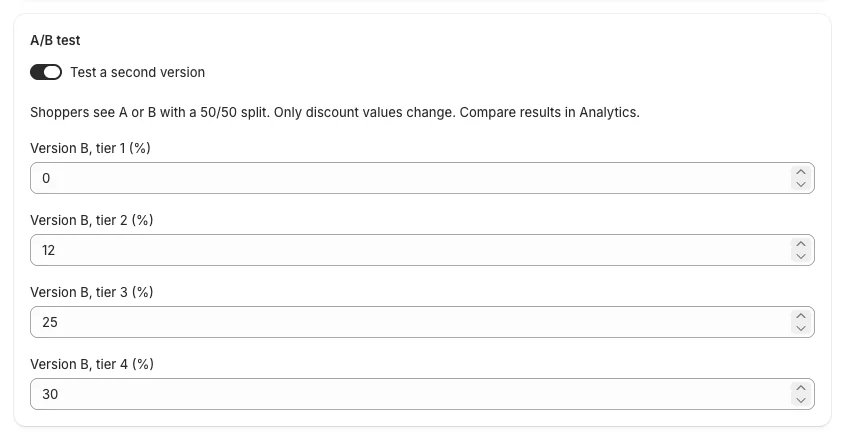
- Open the offer and scroll to A/B test.
- Turn on Test a second version.
- Enter version B's discount for each tier ("Version B, tier 2 (%)"). Everything else — products, tiers, texts, eligibility — stays shared.
- Click Save. The test starts now.
What shoppers get
- Each shopper is placed in version A or B, 50/50, and keeps that version on every visit, on every page, in the cart and at checkout.
- Each test splits shoppers on its own: with two tests running, a shopper can be in B for one and A for the other.
- The price shown on the product page is the price charged, also through Buy it now and the wallet buttons (Shop Pay, Apple Pay, Google Pay) on the product page.
Read the results
Go to Analytics. Each running or finished test has an A/B tests card.

For each version:
- Orders: every order from shoppers in that version, including orders that did not reach a discount;
- Orders that used the offer;
- Revenue, Discounts from this offer and AOV (average order value).
Compare Revenue first. Both versions get the same number of shoppers, so the version with more revenue earns more. A bigger discount can bring more discounted orders without more sales: that shows as more "orders that used the offer" but not more revenue.
Until each version has about 30 orders that used the offer, the card says Not enough orders yet to compare.
Keep the winner
- Click Keep A or Keep B.
- Confirm. The test ends: version B's discount replaces version A's in the offer (Keep B), or version B is removed (Keep A). Every shopper now gets the kept version.
- The card stays in Analytics with the final results and a Kept A / Kept B badge.
Good to know
- Orders placed without the shopper's version (POS, draft orders, or a payment button that opens inside a frame) are not counted; the card says how many.
- Turning the test off in the editor ends it as Keep A.
- A shopper who clears their browser data may get a new version.