
Free shipping
"Free shipping over $75." The cart shows how much more the shopper needs.
Available on every plan.
Create a free shipping offer
- Go to Offers → Create offer and click Use template under Free shipping (or type
Free shipping over $50and click Build it). - Name and Discount message ("Free shipping").
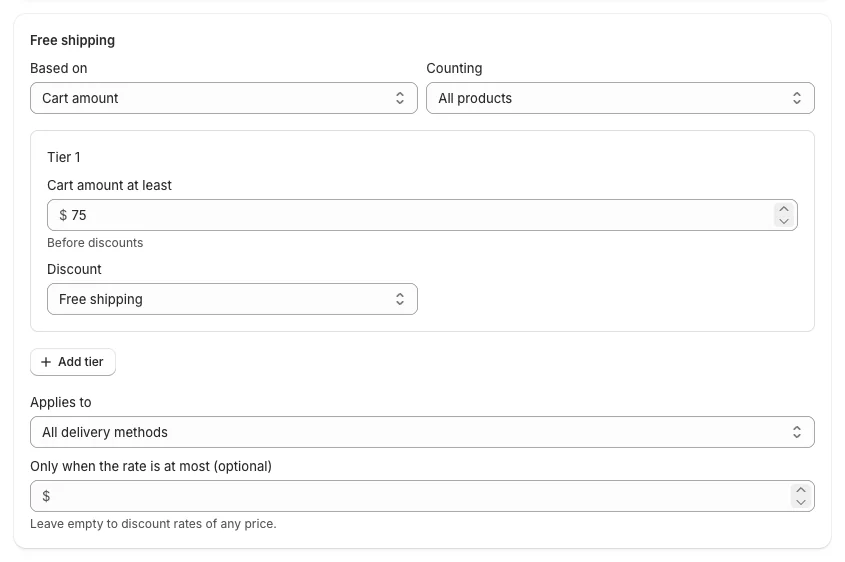
- In Free shipping:
- Based on: Cart amount or Number of items; Counting: all products or only some.
- Tier 1: Cart amount at least (75) and Discount: Free shipping, Percentage off shipping or Amount off shipping. Add tiers for "50% off shipping over $50, free over $100".
- Applies to: All delivery methods, or Methods whose name contains… (for example "Standard"), so express rates stay paid.
- Only when the rate is at most (optional): discount only rates up to this price. Leave empty for any price.
- Storefront: the Progress message ("Spend {amount} more for free shipping") and the Message when unlocked ("You've unlocked free shipping!").
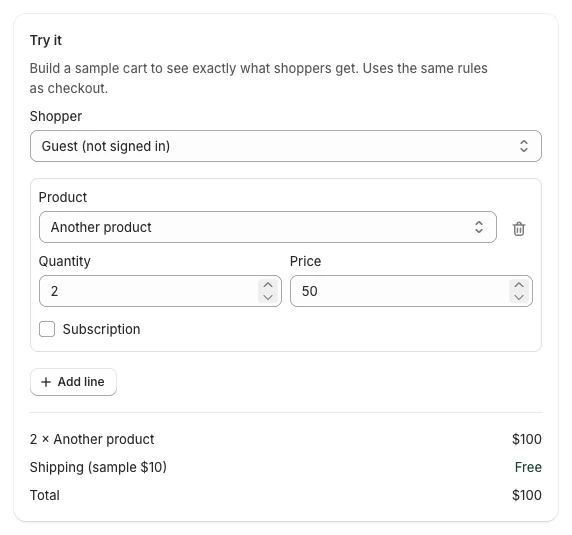
- Check Try it with a cart above and below the amount.
- Click Create offer.
What shoppers see
- In the cart drawer, on the cart page and in the floating deals button: "Spend $18.00 more for free shipping".
- At checkout, the qualifying shipping rates show as free (or discounted).
Good to know
- The amount uses the cart subtotal before discounts.
- Free shipping offers never combine with other shipping discounts.
- Shipping offers cannot be A/B tested.